From the Lab to the drop, the whole match is prepared here.

Builds, team decks and plans on the real maps in 3D, alone or as a team.

Already have an account? Sign in

Three tools, one chain

Each tool feeds the next. A build saved in the Lab shows up in your Decks; a deck set opens its map with the BLUFOR already placed.

01Build

Lab

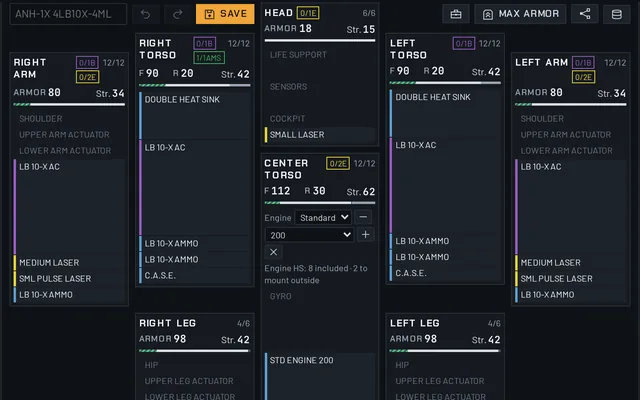
Drag and drop, game rules checked live, exact stats and MWO build codes.

Open the Lab
02Compose

Decks

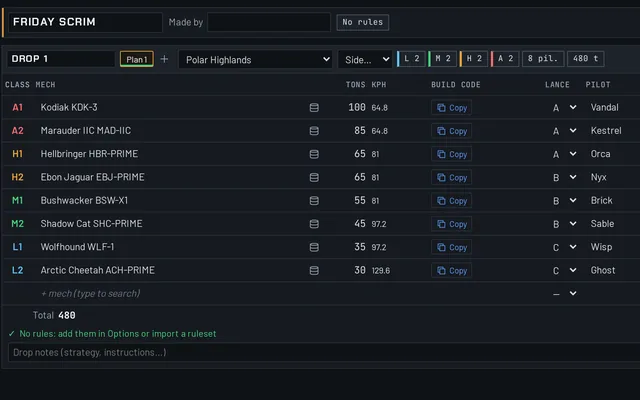
One table per set, pilots and lances A to C, league rules in one click, edited together.

Open the Decks

03Plan

Map

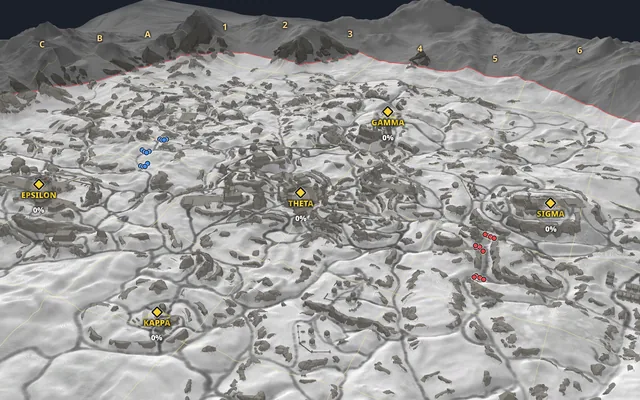
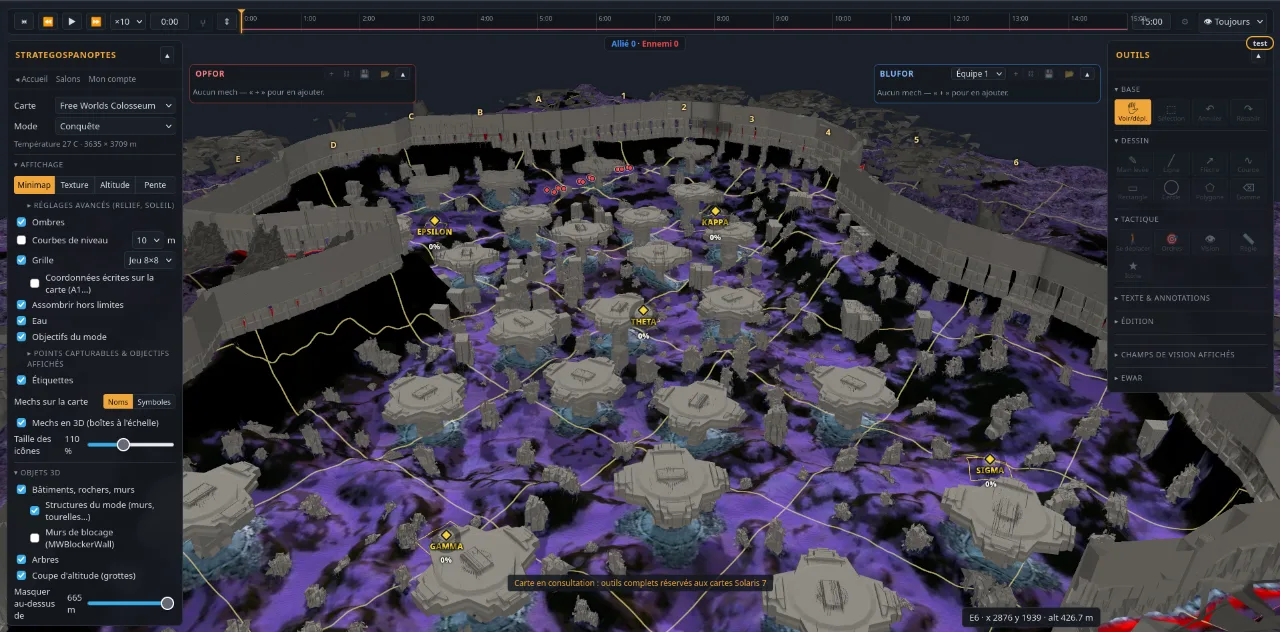
Real maps in 3D, lines of sight and firing lines, timeline, capture, EWAR, plans presented to the team.

Open the Map

Map

What the Map can do

  • 3D maps

    Terrain, buildings and objectives taken from the game files.

  • Lines of sight

    What a mech sees, optimal and max ranges; terrain blocks the view.

  • Firing line

    Arrows toward the aimed point, adjustable convergence.

  • Timeline

    Movements, fields of view and drawings over time.

  • Divergences

    Variants of a plan, branches picked during the presentation.

  • Capture

    Capture times under the chosen rules, competitive ones included.

  • EWAR

    ECM and BAP bubbles, mechs detected or not.

  • Briefings

    Plans exported as images, presentation followed on a phone.

Shared rooms

The whole team on the same plan

A room brings together the decks, the shared builds and the plans of the evening. Everyone sees the others' changes live.

  • Admin, editor, pilot and spectator roles
  • Instant sharing: every deck change reaches everyone
  • Built-in private database: your builds, kept to the room
  • The briefing in your pocket: every pilot follows on their phone

Example room5 online

  • Pilot 1 Admin
  • Pilot 2 · editing Set 2 · Plan 1 Editor
  • Pilot 3 · drawing a route Editor
  • Pilot 4 · following the presentation Pilot
  • Pilot 5 Spectator

1,294factory loadouts of the game validated by the Lab

2custom rulesets created

59plans created in rooms

11updates since October 2, 2026

Updates

What changed recently

The site evolves every week. Here are the latest versions.

  1. v1.32

    The site and the Lab on phones

    • The site works on phones: drawer menu, panels that slide up from the bottom of the screen, buttons big enough for a finger, long press to show tooltips.
    • Lab on phones: the Atlas (the mech shown as a map, tap a part to equip it), readable front paperdoll, armor set with + / −, Max and Distribute, mech picker with filters and variant preview, save to the library of your choice.
    • Skill tree on phones: editable family list, nodes easy to tap, node details in a panel, collapsible categories.
    • Mech sheet, Decks and library on phones: full-screen sheet with collapsible sections, mech cards, mech search and moving a mech to another drop by tapping, sort, filters and long-press selection.
    • More faithful fire simulation: continuous-fire weapons, shots between two calculation steps, RAC spin-up and jamming, ghost heat computed weapon by weapon.
  2. v1.3

    Automatic patches, skill tree and a reworked Lab

    • Game data stays up to date on its own: each MWO patch is read from the notes before release (preview), then confirmed by the game files on release day (official), maps included.
    • New Patches page: timeline of versions and a readable changelog (weapons, equipment, quirks by chassis, new mechs, skill nodes), with links to the Lab and the mech sheet; patch notifications you can turn on in your account.
    • Lab: pick the game data version, compare a build before / after between two versions, see the impact of the latest patch on your builds in My mechs, and a banner when new data arrives.
    • Full skill tree in the Lab, as in the game: tabs, nodes placed and linked as in the game, real values for the mech, and the game's skill code to copy or paste as is.
    • A build keeps its tree: its stats include it everywhere (mech sheet, comparison, My mechs, Decks, Map), with a with / without skills switch; named trees reusable from your account.
  3. v1.22

    Lab fixes

    • Lab: tonnage follows the game rounding (structure rounded to the half ton, armor at its exact weight, total shown rounded up to the tenth); a build the game refuses for a few kilos too many is refused in the Lab too.
    • Ghost heat: weapons of the same group add up (3 ERPPC + 1 Gauss = 4 ERPPC), weapons without a group (SRM 2, flamers…) count alone; the Lab shows an alert as soon as a volley triggers ghost heat.
    • Heat chart of the Analysis tab: the scale goes above 100% when the heat does, the part above 100% is tinted red.
    • Mech picker: IS and Clan are checked by default and the "All" button is gone; equipment filter without "All": nothing checked = no filter, otherwise the mech must be able to carry everything checked (JJ + MASC + ECM).
  4. v1.21

    Competitive mech sheet

    • New mech sheet, built for competitive play: 6 key figures with their percentile, alert band (overheat, ghost heat, ammo under 30 s, IS XL, unused tonnage), numbered sections and a foldable weapon table. Open it from the Lab, My mechs and Decks.
    • Advanced paperdoll at the centre of the sheet: front outline, real cockpit hitbox and the height of every weapon relative to the cockpit.
    • New figures: PPFLD (adjustable burst window, saved in your account), 5 s and 10 s bursts, effective range at 75% and 50% of the alpha, trade ratio, share of the alpha mounted high.
    • Comparison: 6-axis percentile radar and a table grouped by the sheet sections, with the gaps.
    • Percentiles computed against your library by default; TTK applies the same skill preset to both mechs.
  5. v1.2

    Build and drop analysis

    • Analysis tab in the Lab: damage by distance, heat, time to kill, engine, ammo.
    • Compare 2 to 4 builds, against stock mechs or your library.
    • Decks: analysis of a drop, with team totals and coherence alerts.
    • My mechs: scatter plot with Pareto front.
    • Advanced quirk filter when picking a mech in the Lab.
Full changelog

v1.32 · · The site and the Lab on phones

  • The site works on phones: drawer menu, panels that slide up from the bottom of the screen, buttons big enough for a finger, long press to show tooltips.
  • Lab on phones: the Atlas (the mech shown as a map, tap a part to equip it), readable front paperdoll, armor set with + / −, Max and Distribute, mech picker with filters and variant preview, save to the library of your choice.
  • Skill tree on phones: editable family list, nodes easy to tap, node details in a panel, collapsible categories.
  • Mech sheet, Decks and library on phones: full-screen sheet with collapsible sections, mech cards, mech search and moving a mech to another drop by tapping, sort, filters and long-press selection.
  • More faithful fire simulation: continuous-fire weapons, shots between two calculation steps, RAC spin-up and jamming, ghost heat computed weapon by weapon.
  • Lab on tablets in landscape: paperdoll on 4 columns and narrower side panels.
  • Mech sheet: weapon summary in the bottom right of the paperdoll.
  • Lab: tonnage and slot tooltips on the armor and structure options, top speed in the engine tooltip, engine categories collapsed by default.
  • Automatic patches: patch note reading adapted to the new MWO website, and a fix to game data delivery, which had missed the October 20th patch.

v1.3 · · Automatic patches, skill tree and a reworked Lab

  • Game data stays up to date on its own: each MWO patch is read from the notes before release (preview), then confirmed by the game files on release day (official), maps included.
  • New Patches page: timeline of versions and a readable changelog (weapons, equipment, quirks by chassis, new mechs, skill nodes), with links to the Lab and the mech sheet; patch notifications you can turn on in your account.
  • Lab: pick the game data version, compare a build before / after between two versions, see the impact of the latest patch on your builds in My mechs, and a banner when new data arrives.
  • Full skill tree in the Lab, as in the game: tabs, nodes placed and linked as in the game, real values for the mech, and the game's skill code to copy or paste as is.
  • A build keeps its tree: its stats include it everywhere (mech sheet, comparison, My mechs, Decks, Map), with a with / without skills switch; named trees reusable from your account.
  • Mech picker: filter by hardpoints and by location, weapon capacity, omnipod search, jump height filter, sorting by DPS and range, compact filter bar.
  • Lab: mech tabs, floating toolbar, max armor button, armor set with the gauge or the keyboard (Shift ±10, Ctrl ±5) with quirks and skills shown, ammo top-up and ammo warnings (in Decks too).
  • Mech sheet: percentiles against every player's builds, the game hitboxes in 3D, PPFLD mode set in your account.
  • Map: mechs drawn with the hitboxes of their variant, cockpit view, lines of sight from the weapons and fire lines between enemies.
  • Home page: real captures of the Lab, Decks and Map; after signing up you land on the home page to pick a tool. Anonymous, cookieless audience measurement (details in the privacy policy).

v1.22 · · Lab fixes

  • Lab: tonnage follows the game rounding (structure rounded to the half ton, armor at its exact weight, total shown rounded up to the tenth); a build the game refuses for a few kilos too many is refused in the Lab too.
  • Ghost heat: weapons of the same group add up (3 ERPPC + 1 Gauss = 4 ERPPC), weapons without a group (SRM 2, flamers…) count alone; the Lab shows an alert as soon as a volley triggers ghost heat.
  • Heat chart of the Analysis tab: the scale goes above 100% when the heat does, the part above 100% is tinted red.
  • Mech picker: IS and Clan are checked by default and the "All" button is gone; equipment filter without "All": nothing checked = no filter, otherwise the mech must be able to carry everything checked (JJ + MASC + ECM).

v1.21 · · Competitive mech sheet

  • New mech sheet, built for competitive play: 6 key figures with their percentile, alert band (overheat, ghost heat, ammo under 30 s, IS XL, unused tonnage), numbered sections and a foldable weapon table. Open it from the Lab, My mechs and Decks.
  • Advanced paperdoll at the centre of the sheet: front outline, real cockpit hitbox and the height of every weapon relative to the cockpit.
  • New figures: PPFLD (adjustable burst window, saved in your account), 5 s and 10 s bursts, effective range at 75% and 50% of the alpha, trade ratio, share of the alpha mounted high.
  • Comparison: 6-axis percentile radar and a table grouped by the sheet sections, with the gaps.
  • Percentiles computed against your library by default; TTK applies the same skill preset to both mechs.
  • Mech picker in the Lab: paperdoll on each variant (hardpoints by component, cockpit target on hover); fixed omnimech hardpoints are counted.
  • My mechs: alpha, sustained DPS and HP before destruction shown by default.
  • Game data updated to the latest MWO patch (mech quirks, IS and Clan LRMs).
  • The engine chart of the Analysis tab is removed.

v1.2 · · Build and drop analysis

  • Analysis tab in the Lab: damage by distance, heat, time to kill, engine, ammo.
  • Compare 2 to 4 builds, against stock mechs or your library.
  • Decks: analysis of a drop, with team totals and coherence alerts.
  • My mechs: scatter plot with Pareto front.
  • Advanced quirk filter when picking a mech in the Lab.
  • Site and tool available in Russian.
  • My mechs faster with many builds; speed and range back on the Map; no more wrongful "Session expired".

v1.1 · · Lab, Decks and stock mechs

  • New Lab: build your mechs by drag and drop, with game rules checked live, every stat, ghost heat, quirks grouped by family and MWO build codes.
  • New Decks tool: one table per set, like your spreadsheet, with total tonnage and margin, edited together in real time in the room.
  • League rules in one click (MWO Comp CS 2026, Trials of Combat 3): sets and maps created, mechs and maps not allowed hidden, errors shown live.
  • My mechs page: your library of builds, imported from your codes or your CSV, with filters, sorting and a column picker, and used by the Map, the Lab and the Decks.
  • 477 stock mechs replace the demo list, next to your library, with a button to show or hide them.
  • A set opens on the Map: its BLUFOR follows the deck live (mechs, pilots, lances, side).
  • Builds are private by default: share one, or your whole library, with a room, or create a public link.
  • Several plans per set to compare line-ups; build codes copied in one click; lances A to C checked (4 mechs at most).
  • New home page featuring Crimson Strait in 3D, a new visual identity for the site and the tools, and faster switching from one tool to another.

v1.0 · · Firing line

  • New Firing line tool: draw a line, click the target point, and arrows fan out from the line toward that point (adjustable convergence).
  • Better plan handling: free name for a new plan, tabs reordered by drag and drop, plans outside the evening in a menu, rename or delete a plan without opening it.
  • Conquest capture now follows MWO's rules; cables and wires no longer block line of sight.
  • "The room follows my view" toggle on your own row of the In the room panel, and a warning when the browser is not using the graphics card.
  • Optional arrowhead on curves, and adjustable size for icons placed on the map.
  • In presentation mode, the branch tree expands so you can choose which branch is shown.
  • Mechs are now shown as symbols by default, with new class and role icons.
  • Move button in the mech properties, and a confirmation before clearing a path.
  • Terrain: 3D view or flattened view, and strokes 30% thinner.
  • The tool logo now returns to the home page; timeline ticks are readable on phones; long mech names scroll again.

v0.9 · · New interface

  • New tool interface: one tab per plan of the evening, Design and Presentation modes, toolbar with submenus, Display and Detection panels.
  • On phones: adapted home page and the tool in presentation mode, to follow a presentation or manage your room.
  • New icons for all buttons, with a tooltip on hover.
  • New logo: the hourglass and the eye.
  • Tutorial updated for the new interface.

v0.9 · · Guided tour

  • Guided tour the first time you open the tool, which you can replay from the settings.

v0.9 · · Rooms and languages

  • Shared rooms: work mode, common plan, and the presenter's view followed by the whole room.
  • Site and tool available in English, German and Thai.
  • New home page featuring the Polar Highlands map as a 3D hologram.
  • Moves and orders for selected mechs; each waypoint is saved in the plan.
  • More faithful capture simulation: neutral band in Conquest, points counted from 20%.
  • Demo mech list by default, and a guide to import your builds with MWO Build Manager.

v0.9 · · Launch

  • First releases of the site: accounts, real-time rooms and the hosted tool.

Open and free beta

With an account, you get every tool on every map. Without an account, the demo opens on Steiner Coliseum.

Create account

Ready for the next drop?

MechWarrior OnlineOther games · coming

Create account